You already filmed a week's worth of content. It's sitting in one 40-minute workout video on your phone — the full session, every set, every cue. The problem isn't that you need more footage. It's that turning workout videos into Reels — the short clips people actually watch — feels like a second job.
It usually is one. The rule of thumb across short-form is 4 to 8 hours of editing for a single hour of finished clips — which is why "30-second Reel, hours of work behind it" is its own genre of post now. But the creators who post consistently aren't editing more. They're running a repeatable flow that turns one shoot into five, eight, even ten platform-native clips without the all-night scrubbing.
Here's that flow in five steps. It's tool-agnostic — works in CapCut, on your phone, or in whatever editor you already use — and it's built around how the 2026 algorithms actually rank short-form: saves and shares over likes, completion over length, and the first 1.5 seconds over everything.
Step 1: Mine the workout for "clip moments"
The biggest time-saver happens before you cut anything: decide what you're hunting for. Scrubbing a 40-minute video with no plan is what eats the hours. Knowing the four or five moment-types that clip well turns it into a treasure hunt.
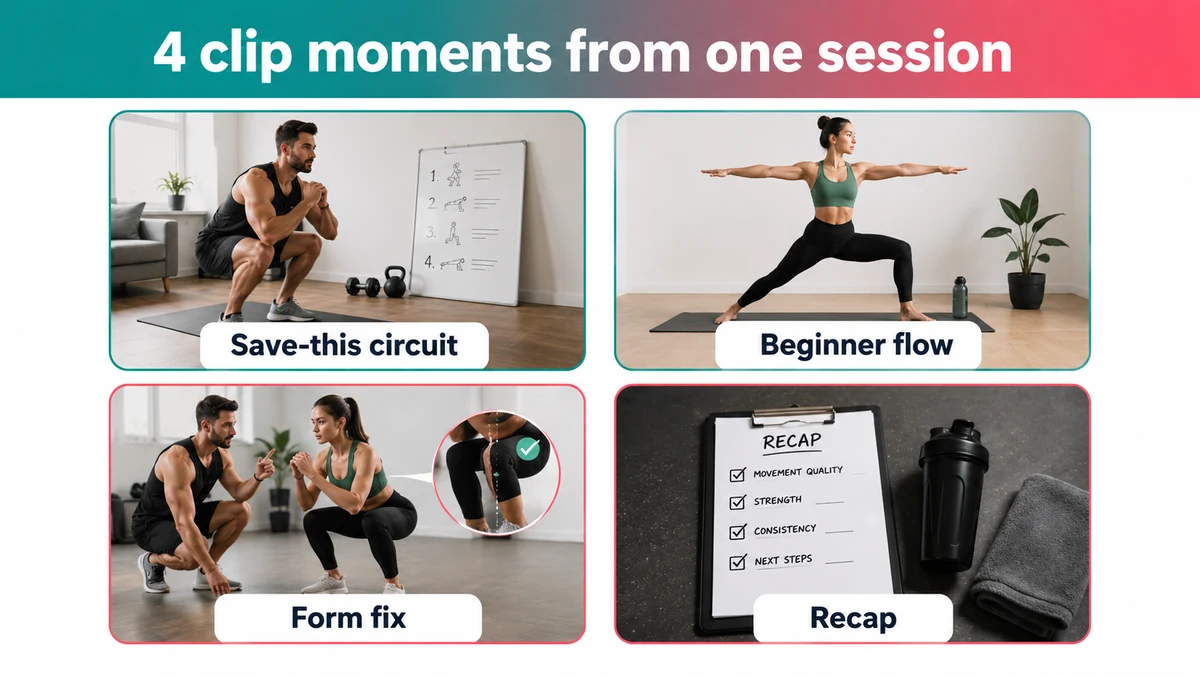
The moments that consistently earn saves and rewatches in fitness short-form aren't the heaviest lifts — they're the useful, repeatable, "I could do that" moments:
- The "save this" mini-circuit — 3–4 moves a viewer can screenshot and run later. Saves are the single strongest distribution signal in 2026, and a circuit is built to be saved.
- A smooth, beginner-friendly flow — one clean sequence that looks doable, not intimidating.
- A single myth-bust or form fix — "stop doing X, do this instead," over B-roll of the correct rep. One idea, fully resolved.
- The post-workout recap — a quick "here's what we just did" that doubles as a hook for the full session.
So one ordinary session — say a 40-minute lower-body workout — isn't one video. It's a warm-up flow clip, two or three "save this" finisher circuits, a Bulgarian split squat form fix, a "3 glute moves people skip" cutdown, and a recap. That's eight to ten clips from a single shoot before you've filmed anything extra.
If you film with these in mind, you'll even catch yourself setting them up live — a clean front angle for the form fix, a slow rep for the circuit. That's the whole trick: plan the clips into the shoot, don't excavate them after.
Step 2: Trim to the 15–30 second sweet spot
Once you've pulled your moments, cut hard. The data is blunt here: short-form videos under ~90 seconds average around 50% completion, Shorts average roughly 73% retention, and the ones that go viral (>1M views) sit near 76% — peaking at 15–30 seconds. Length is not depth. A tight 20-second clip beats a baggy 60-second one.
Trimming is mostly subtraction:
- Cut the walk-up, the re-rack, the "okay so" throat-clearing. Start on the movement.
- One clip = one idea. If you're explaining two things, that's two clips.
- Leave the rest times on the cutting-room floor. Dead air is where viewers swipe.
The goal isn't to cram the whole exercise in — it's to make the 20 seconds you keep impossible to swipe past.
Step 3: Hook the first 1.5 seconds
The opening 1–3 seconds decide whether a clip gets watched, saved, or skipped — it's the most-discussed lever in short-form for a reason. A great clip with a flat first second dies in the feed.
Four hook shapes do the heavy lifting; pick one per clip:
- Curiosity — "The leg-day finisher I stopped telling clients about."
- Problem → solution — "Knees hurting on squats? Change this one thing."
- Educational — "Most beginners get this glute move backwards."
- Challenge / trend — "Try this 30-second hold before you scroll on."
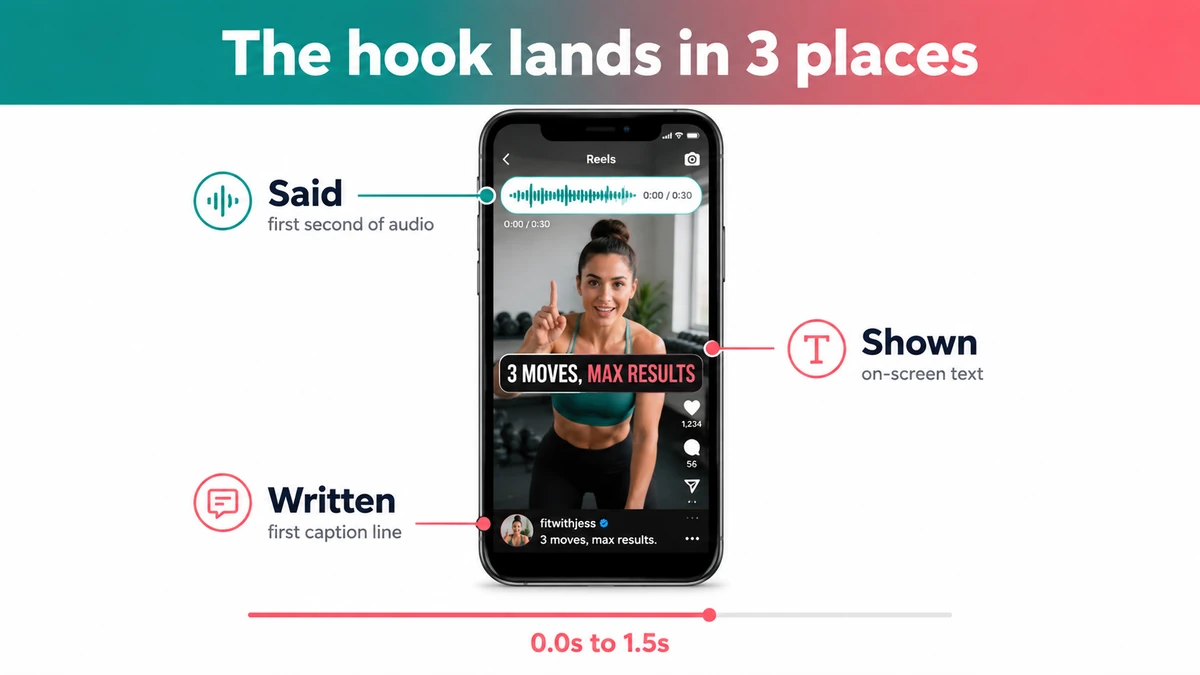
Then make the hook land in three places at once: say it in the first second, show it as on-screen text, and write it as your first caption line. When audio, text, and caption all carry the same phrase, the platform understands what your clip is about — and discoverability can jump meaningfully.
Step 4: Size it vertical — and respect the safe zones
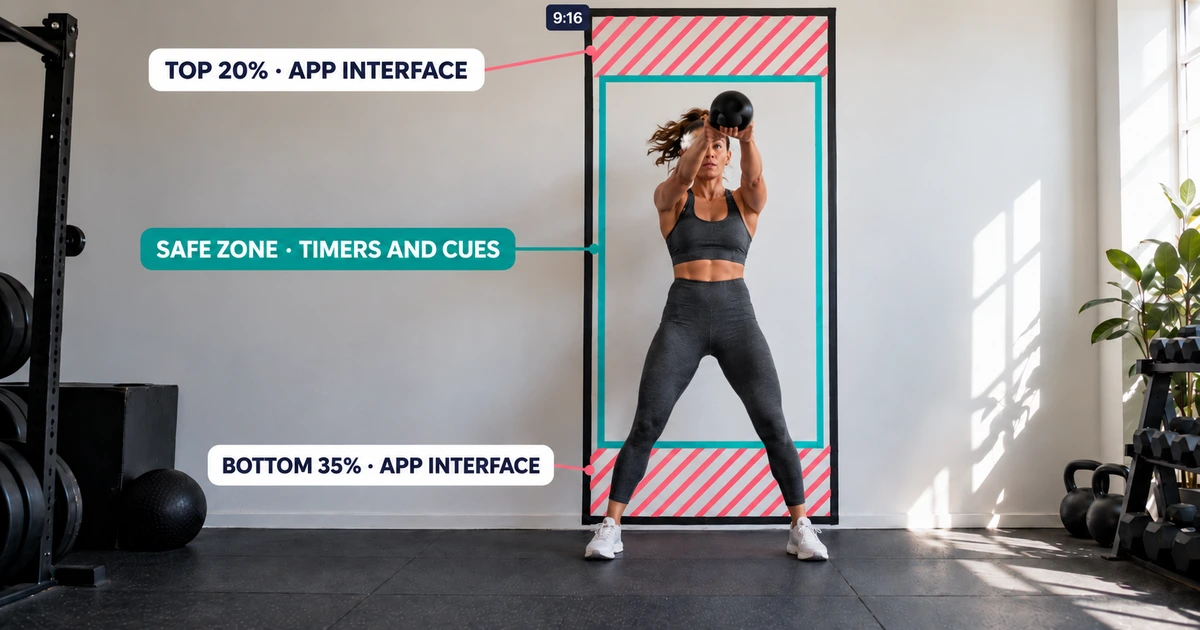
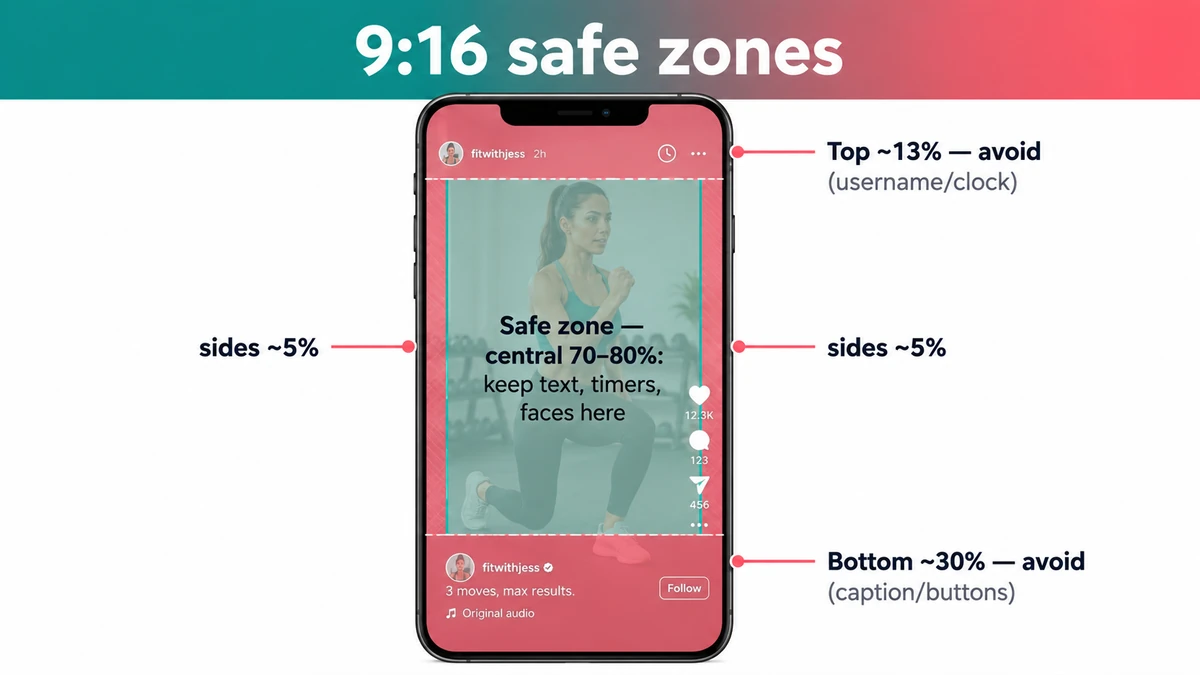
Every clip ships 9:16 vertical. But the frame isn't all usable: the platform's own interface — username, caption, buttons — sits on top of your edges. Put a timer or your key text there and it gets covered.
Keep anything that matters — text, rep counters, faces — inside the central 70–80% of the frame. As a rule of thumb, leave clearance of about the top 13–14%, the bottom 20–35%, and 3–6% on each side.
One fitness-specific wrinkle: gym footage is often unusable audio — clanging plates, a noisy room, music you can't license. That makes on-screen text non-negotiable. Burn in your move names, rep counts, and cues so the clip works muted (most feed viewing is), and add captions for the talking parts. Treat text as the soundtrack.
Step 5: Caption for search, post for saves
The last step is packaging — and in 2026 it's also SEO. 74% of Gen Z use TikTok as a search engine, so your caption is a search field, not a diary entry.
- Write the way people search. The pattern that works: action + content type + platform/context — "turn this into your next home workout," "no-equipment beginner circuit." Front-load the long-tail keyword in your first line.
- 3–5 precise hashtags, niche over broad (
#homeworkout,#beginnerfriendly), never#fyp. - Ask for the save. "Save this for your next session" beats "follow me" — saves and shares are weighted above likes, and they're what pushes a clip past your followers.
- Mind the first 30–60 minutes. Early velocity shapes distribution, so post when your people are actually around.
- Give the algorithm clean topical signals. With Instagram's "Your Algorithm" controls, clear on-screen text, keywords, and alt text help your clip get filed under the right interest — and shown to the right strangers.
Two quick traps: don't upload TikTok-watermarked clips to Reels (reduced reach), and while Instagram now allows Reels up to three minutes, shorter still wins for reach and retention. Save the long version for YouTube.
The repurposing checklist
Keep this next to your editing setup:
- ✅ Clip moments planned before/while filming (circuit, flow, form fix, recap).
- ✅ Each clip is one idea, trimmed to 15–30 seconds, starting on the movement.
- ✅ Hook in the first 1.5s, said + shown + written as the same phrase.
- ✅ 9:16, key text inside the central 70–80%, off the UI edges.
- ✅ On-screen text + captions so it works muted.
- ✅ Caption front-loads a search phrase; 3–5 niche hashtags; one "save" CTA.
The slow part — finding the clip-worthy moments — is exactly what ActiveSnap's AI fitness video editor automates; there's a free plan to try it.
Batch it: one shoot, a week of reels
The reason this is a flow and not a list is that it compounds. Run it on one session and you don't get one Reel — you get a circuit clip, a form fix, a beginner flow, and a recap, each sized for Reels, TikTok, and Shorts. That's a week of posting from an afternoon of filming. Simplicity is the system: the creators who last aren't the ones grinding hours per clip, they're the ones who made repurposing repeatable.
That's the workflow ActiveSnap is built around — start free if you want to try it.
For the per-platform side of packaging — exactly how the title, caption, and hashtags should change between YouTube, TikTok, and Reels — see Per-Platform Posting Best Practices for Fitness Creators.
A note on claims: fitness results vary from person to person. Describe what a workout is and who it's for; avoid promising specific fat-loss or medical outcomes — it builds more trust, and platforms are tightening up on health claims anyway.
The slow part of all this is finding the clip moments — scrubbing a long workout for the ten seconds worth keeping. It's also the part that generic AI editors are worst at: most of them cut on speech, so they miss the best silent moments in a workout. Tools that detect the exercises themselves can surface those moments for you, but the flow above is what you're optimizing for either way — by hand or automated.