
Clips Builder
Make multiple short clips from one workout
Turn a full-length workout into several vertical clips, or polish a short you’ve already filmed for Shorts, Reels, or TikTok. Ask Clips Builder to find moments like your best form cues. Get a suggested hook and post caption for each clip, then add on-screen captions in the editor.
No credit card required. During Open Beta, you can join our Discord and talk directly with the ActiveSnap team on any plan.
Inside Clips Builder
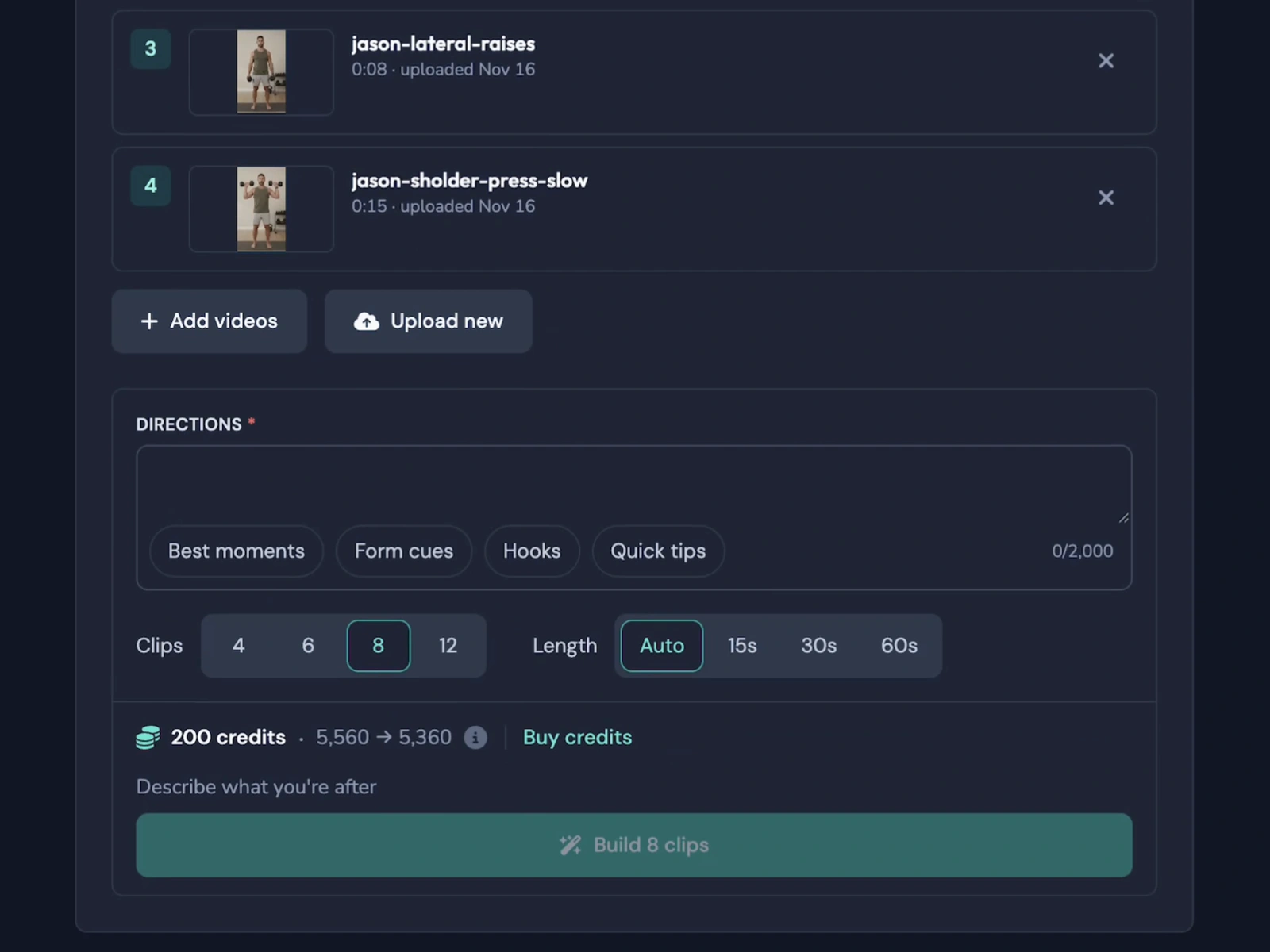
Choose your workouts and set how many clips you want and how long they should be. 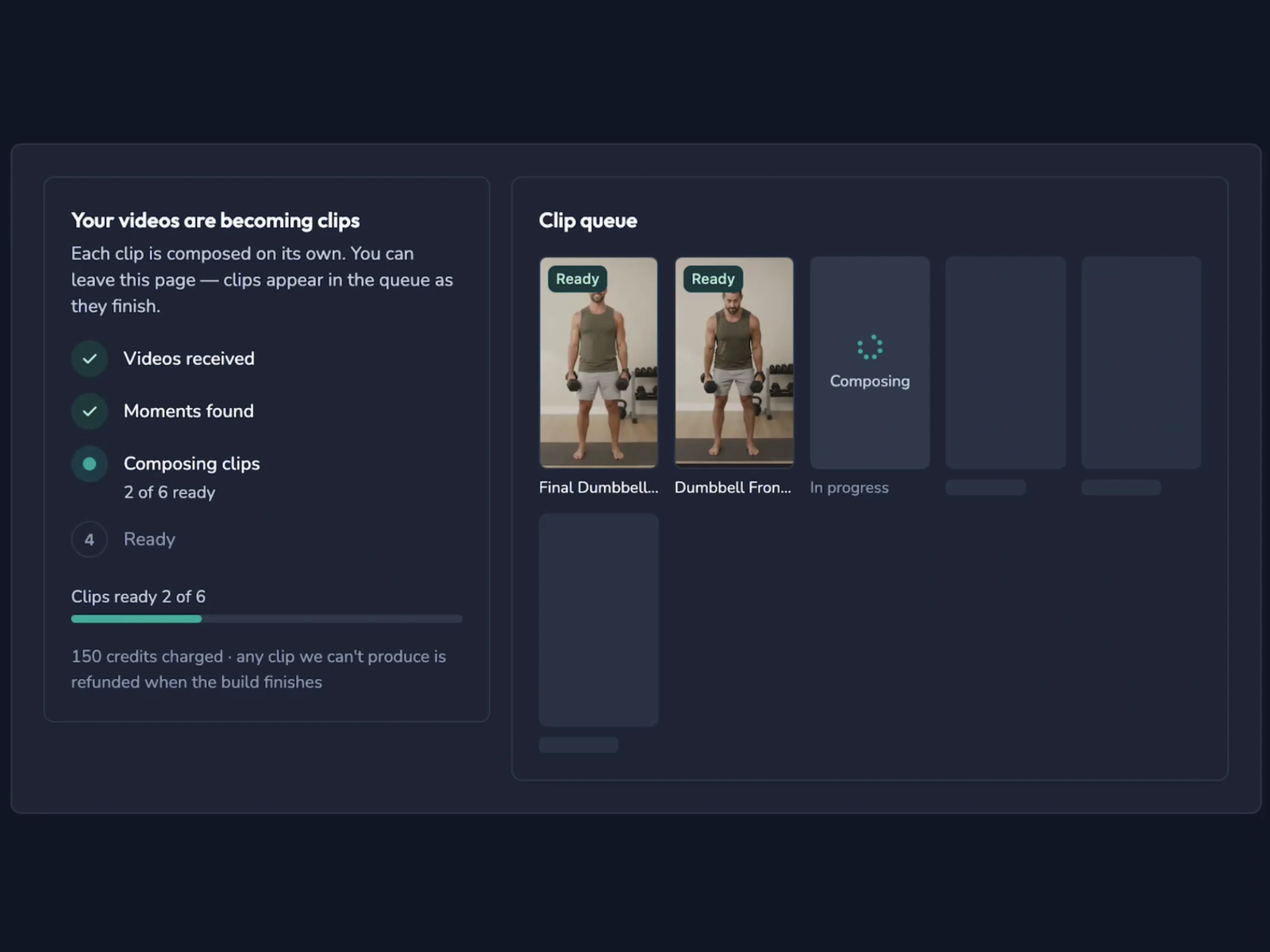
Check which builds are in progress and which clips are ready to review. 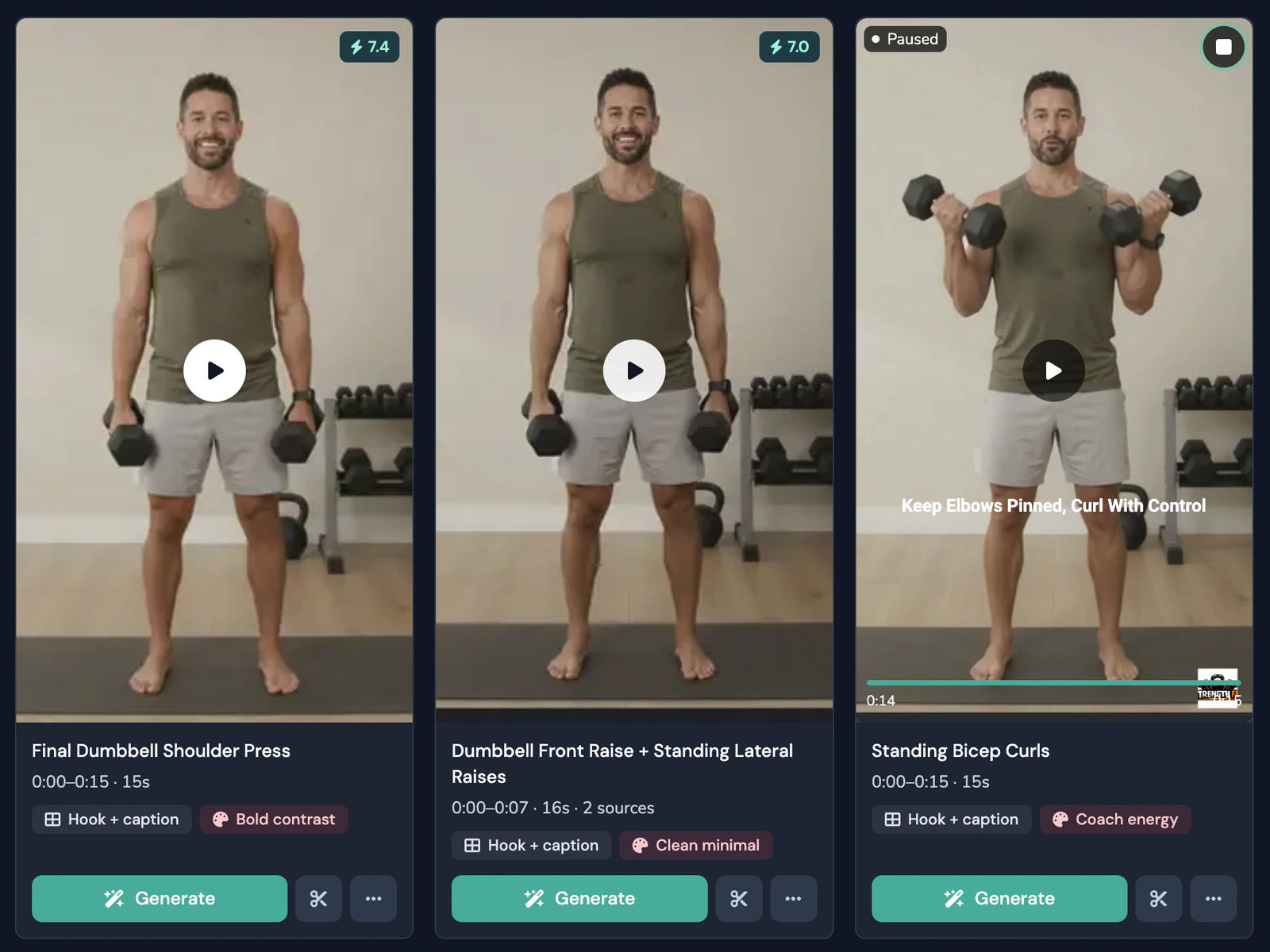
Review a clip’s score, hook, caption, and style. The “2 sources” badge means it pulls from two videos.
What you get
Pull from up to 10 workout videos
Start with one workout or use several videos in the same build. Clips Builder can combine moments from different workouts and shows how many videos each clip draws from.
Tell it what to look for
Try “Find the moments where I explain squat form,” or start with Best moments, Form cues, Hooks, or Quick tips.
Review the highest-scoring clips first
Sort your results by score and see where each clip pulls from. Each one also comes with a suggested hook, post caption, and style.
Get vertical clips for social
Every clip is 9:16. Pick 15, 30, or 60 seconds, or choose Auto to let Clips Builder pick the length.
See the credit cost up front
You’ll see the cost before you start. If Clips Builder finds fewer usable moments than you asked for, you get the credits back for the clips it couldn’t make.
Edit your favorites or generate them as they are
Open a clip in the editor to make changes or add on-screen captions. When you’re happy with it, click Generate Video.
How it works
- 1
Pick your workouts
Choose a brand, then select up to 10 videos from your library or upload new ones.
- 2
Describe the clips you want
Write a request or pick a starting point. Then choose how many clips you want and how long they should be.
- 3
Keep working while it builds
Clips Builder runs in the background. Check your builds for the Complete status.
- 4
Review your clips
Open a favorite in the editor to make changes, or click Generate Video to create it as is.
Clip options
Starting points
- Best moments
- Form cues
- Hooks
- Quick tips
Clips to request
- 4
- 6
- 8
- 12
Clip length
- Auto
- 15s
- 30s
- 60s
Clip styles
- Bold contrast
- Clean minimal
- Coach energy
Frequently asked questions
How many videos can I use at once?
Up to 10. A clip can use moments from more than one workout. When it does, the clip card shows how many videos it used.
What can I ask Clips Builder to find?
Try “Find quick tips for beginners” or “Pull out my best form cues.” You can write up to 2,000 characters or choose a starting point.
What size and length are the clips?
Every clip is vertical (9:16). Choose 15, 30, or 60 seconds, or pick Auto. You can request 4, 6, 8, or 12 clips per build.
Can I leave the page while it builds?
Yes. The build keeps running in the background. You can come back to your builds to check the status.
What if it finds fewer clips than I asked for?
You’ll see how many clips it found and get credits back for the ones it couldn’t make. You’ll see the credit cost before you start. See Pricing for plan details.
Can I edit a clip before generating it?
Yes. Open it in the editor to make changes or add on-screen captions. You can also click Generate Video if you’re happy with it as is.
Explore more features
Thumbnail Generator
Turn a frame from your workout, or your own image, into thumbnails in your Brand's colors and font.
Animations
Drop in moving titles, name bars, text styles and transitions. Templates fill in your logo and colors for you.
Filters
Give your footage a new look in one click. Browse six categories and see each one on your own shot before you add it.
Licensed music library
ActiveSnap's own AI-generated music in five energy levels, licensed for videos you make with ActiveSnap.
Timers & loaders
Put a countdown or count-up timer on screen, with bars that fill as you go, so viewers can follow with the sound off.
Captions
Subtitles written from your audio in one click, in styles that pick up your brand font and colors.
Picture-in-picture preview
Show the next exercise in a small corner window while the current one plays, so viewers stay for the whole set.
Social media calendar
Post now or pick a time for YouTube, TikTok, Instagram and Facebook, and see every post on one calendar.
Full toolbox
Every ActiveSnap feature for fitness creators, on one page.
Also see AI fitness video editor and Pricing.
Make your next short from footage you already have
Pick a workout or a short clip and tell Clips Builder what to look for.
No credit card required.
Last reviewed: 2026-11-17